I am appalled at the lack of resources dealing with creating and distributing games made in Java on Facebook. Perhaps it is because no-one makes on-line games in Java, perhaps it is because the process is actually so easy it doesn't need documented or perhaps the people who have managed it want to keep the process a secret so they can make all the monies themselves! Whatever the reason, this post aims to buck the trend and document what is in fact a really easy process.
Just as a quick heads up here is what this post will and won't cover:
It will cover:
Deploying your Java applet to the web.
This is a pretty easy step and if you've made an applet before you probably know how to do this.
Making the applet accessible via Facebook.
This is also an easy step it just doesn't seem to be written anywhere else on-line!
Here is the code and the sketch that I promised in part one.
You'll notice I've refactored the code a bit so that the button pressing code is now just 1 method where we pass in the buttons we want to press, the amount of buttons we want to press and the length of time we want to press them for.
This makes a lot more sense on a platform like the Arduino due it's limited memory, no point in filling it up with six methods that do pretty much the same thing. Of course it is good practice in programming in general as well since now if we want to change how we press a button we only have to change it in one place, not six.
Here's a fun little project I've wanted to work on for a while, an automated system that is able to play console based games.
Initially I thought about making a series of wires that connected my PC to a variety of video game consoles via their control ports but since I have the Arduino I think I can throw together something simpler yet just as effective with it.
There are already a few blogs out there showing how to do this, for example this one on instructables which shows you how to tap into a Snes controller or this one also on instructables which shows you how to do the same to an Xbox 360 controller however this isn't quite what I'm looking to do. I want to connect my Arduino directly to the control port of the system, not to the controller. I will admit though using the Arduino as a controller 'expansion' to allow macros and the like is a pretty cool idea and I may come back to that at some point.
I also want to do more with this project than just connect the Arduino to the target system, I also want it to play the games on the system. I've italicised the word play as I'm not exactly certain how I'm going to define the word play yet. Is just moving the character enough or does the character have to be moved towards the goal? Does the system have to work out the goal or can it be pre-programmed in? Does the path to the goal need to be the optimum one or can it be anything as long as it is in the right direction? Does it need to learn?
You may remember at the start of the year I posted this entry on Inside Sega Megadrive Carts where I spoke briefly about an awesome project I saw on insideGadgets.
In the project Alex created an Arduino sketch that was capable of dumping the ROM data from a GameBoy cartridge as well as being able to read and write the data from RAM. This inspired me to get my own Arduino with the aim of one day creating my own dumper for the Sega Megadrive system. Well today is that day!
Ok not exactly today but today is at least the start of it!
In case you can't remember the project here are all the relevant posts from his blog, consolidated into one handy list:
Reading From an EEPROM (Consider this pre-reading, and read the guide he links to as well, it's really helpful)
After the Time Lapse Videos of the Garden project I got thinking about how to get round the issue of nothing being visible at night. If you haven't looked at that project the basic issue is that the infared light generated by the camera is reflecting off the glass of the window making it impossible to see outside.
Two solutions instantly came to mind:
Turn the IR on the camera off and flood the garden with infared light from a source already outside.
Move the whole camera outside.
From the two I've decided to go with the 2nd one. The first idea may actually be easier as you can already buy outdoor infared lights and all I'd have to do is connect the power to them and set up some sort of timer to turn them on and night and off during the day. However, I can't really justify the expense on what is just a 'for fun' project so I'm really stuck with option 2 regardless.
In this video I've removed all the images taken between 8pm and 5am. Don't worry, I didn't have to do this by hand! All the videos save with a similar file name which has the date and time in it so I wrote a little regular expression that deleted all the files with a 00 - 04 or a 20 - 23 in the hour slot. The commands looked like this:
The rm command you should be familiar with, then it is the camera's MAC address (I think) followed by the name in brackets then _0_ (for some reason, maybe camera number) then the 4 digit year, 2 digit month (single digit wildcards), 2 digit date (single digit wildcards) then the 2 digit hour. Notice in the first command I put the first digit of the hour outside the curly bracket, I just wasn't sure 00..04 would work so opted for 0..4 instead. What came after the hour digits didn't matter so I just dropped in a multi digit wildcard.
The camera looking out to the garden has been running for a while now. Since about the 28th of March given the date of my last post on it. As you can imagine it has gathered quite a large collection of images, 18,000 at the last count! So I thought it would be a good a time as any to give another time lapse video a try.
I used the same script as last time but made a slight change so it would create a copy of each image with a 5 digit number rather than 4 (cause we have over 9999 images) and out the video with a greater frame rate (20fps instead of 4).
x=0; for i in *jpg; do counter=$(printf %05d $x); cp "$i" /tmp/img"$counter".jpg; x=$(($x+1)); done
ffmpeg -f image2 -r 20 -y -i /tmp/img%05d.jpg garden.avi
rm /tmp/img*
The results were less than satisfactory (don't watch the whole video, the first minute or so gets the point across):
I don't really post unless I am demonstrating something or talking about my plans but this post is a little different. (Don't worry it's only a short one.) It is also one of the few times I will post the same post on both my computer related blogs: workingwithcomputervision.blogspot.co.uk and czandg.blogspot.co.uk.
This weekend I went down to London with family and during the trip we visited the Science Museum and I thought it would be nice to share a couple of photos of the exhibits from the computing related departments.
There was some pretty cool stuff there demonstrating both the history of computing and the present day (if there were any future orientated displays I didn't notice them.)
Here are a few that caught my interest enough to get photographed (Keep in mind I'm not a huge history buff so although there is a lot there only a handful really grabbed my attention):
I've gotten quite into hillwalking this year. In fact I even have another blog dedicated purely to that which I will shameless plug here: it is munrochallenge.wordpress.com and it details me and my friend Martyn's attempt to climb 52 munros this year. (We've managed 3 so far.) As part of this new hobby I signed up to a few on-line forums to meet other people with similar interests and one of the forums I go on frequently is the one at walkhighlands.co.uk.
It was on here that a user known as Alastair S (probably his real name!) posted up a thread talking about a little computer program he had made. What it does is connects to public internet cameras anywhere in the world you point it to and downloads an image from them once every minute. When it has a large collection of these images it creates a video out of them which is played back at 20 frames per second. This hence lets you watch an entire days, weeks, months or even years worth of footage in just a few minutes. It's a technique known as 'time lapse video' and it can make for some very interesting videos. Here are a couple he has produced so far:
For Christmas Santa was kind enough to bring me a great new
toy known as the Arduino to play with. If you haven’t heard of the Arduino you
can check it out at http://arduino.cc/ but
basically it is a little programmable board than can use a variety of sensors
and components to interact with its environment. It is also, I’m led to
believe, a good way to get an understanding of electrical engineering, circuits
and the like which is something I’ve wanted to know more about for a while now.
One of the very cool projects I’ve saw with the Arduino (and
a large part of the inspiration for me getting one) is this Gameboy Cart Dumper
by Alex of InsideGadgets:
What’s happening in the video is he is showing you his
project that is able to read the data stored on the ROM of the Gameboy cart to
his computer using the Arduino. He is also able to read and write to the SRAM
using exactly the same set up. Basically he has created his own ROM dumper, very
cool!
As you may know I’m a lot more interested in the Sega
Megadrive than the Gameboy so would like to perform the same task on Megadrive
cartridges. In order to do so it is important to see inside the carts so I know
just what I am going to have to deal with. So here is the insides of several Megadrive
carts, hopefully it will be of some use to you as well.
Mega-Lo-Mania
Front
Back
Only 1 chip, the ROM and a couple of components, a resistor on the left and a capacitor on the right I think.
This would be a 'typical' or basic cartridge. The game uses passwords for saving so doesn't need any SRAM making the insides very straight forward.
Ultimate Mortal Kombat 3
Back
Front
I thought it was a large ROM but it doesn’t look like it is as it’s the same as Mega-Lo-Mania only the components are reversed.
Shining Force 2
Front
Back
This game does use SRAM for saving and as you can see there is a lot more going on inside. The big chip at the bottom is the ROM we are used to seeing with its capacitor and resistor. Above it are all the components involved in saving, namely a battery on the right with a small chip next to it. This chip is the controller which decides if we should use the battery or not depending on the voltage across the cart.
Next to that, also at the top, is a NAND gate. I'm not sure what purpose this has at the moment but I think it is for selecting between the other chips available.
The long one below that the SRAM chip which is where all our save data is stored.
I got most this info from Googling the chip numbers which turned up the following pages from alldatasheet.com: (Same order as above) BA6162, SN74HC00N, GM76C88AL.
Mega Games 6
Front
Back
This is a cart that has 6 games on the one cartridge. We can see they are spread across 2 ROMS, we still have a capacitor and resistors dotted around the place and also another chip. This is the same chip as in the Shining Force 2 cart above, the SN74HC00N NAND gate, making me more certain that it is for choosing between chips.
Fantastic Dizzy and Cosmic Spacehead
This is a special case and I thought was worth extra mention even though I couldn't get the cart open! These two games come on the same cart but it is one of those funny J-Carts developed by Codmaster and they don't open the same as standard carts.
At first I thought it was just the 2 clasps on the top that needed pushed in to open it as there aren't any screws visible on the case.
J-cart top clasps
As you can see below, it still isn't open despite me sliding my 2 screws drivers all the way down the side.
Un-openable J-cart
Clearly there is more to it. Upon investigation of my other games I found this:
Screw poking out the front of a J-cart
Close up
There are 2 screws on the front of the cart as well under the sticker! Well played Codemaster, well played!
As it stands I don't want to rip the label of my Dizzy/Cosmic game so I've bought a cheap copy of Pete Sampras Tennis which is also a J-cart just for opening up. It isn't a dual game cart but it does have 2 control ports built into the cart so should be interesting.
I'll post up what it looks like when it arrives.
[It arrives]
Pete Sampras Tennis
So here is Pete Sampras Tennis, I've no idea if it is a good game or not because that's not what we are interested in so I haven't even checked if it's working!
Pete Sampras Tennis with additional control ports
The secret screw
To open it up I used a small star key (it's like an allen key or a hex key but star shaped) which is marked T10. I really don't know much about this tool but it was part of my ratchet set and I'm glad to have finally used it!
The start shaped T10 bit
So with the case open and the PCB removed this is what we are left with:
Front
Back
The control ports, some red things which I'm not sure what they are, some chips (left and right are SN74LS244 and in the middle is... I have no idea, can't get a good hit from Google) and then the ROM.
Getting in Without
Breaking the Carts
When I bought my Flash cart for the Sega I had to open one
of the cases to replace the PCB (the chip boards we've been looking at) with the one for the Flash
board. Unfortunately the Megadrive carts have some funny shaped security screws
which need a special bit to open.
Being the ever resourceful person I decided
to try the ‘melted pen’ method where you get a cheap, plastic pen and melt the
end into the screw then hold it till it dries. It is meant to give you a
plastic screwdriver that can open any of the Megadrive cases. All it gave me is
a broken pen.
I then tried taking a hand drill to one of the carts. This
worked but was a lot like using a bazooka to kill fly and unsurprisingly I
could no longer claim the cart was in ‘mint condition’.
They are really strong, fit in my Black and Decker screw
driver (I think it’s a standard size) and do the job perfectly. For less than a
tenner for both the Nintendo and the Sega bit plus 5 batteries to replace the
ones in your carts that use SRAM they are well worth investing in.
That’s it for now. I’ll have more information about ROM
dumping via the Arduino as and when I work it out and will update this entry
with more Megadrive carts insides as I discover them.
I could talk for hours and hours about computers, it's such a huge topic and there is so many interesting areas, but I'll try and keep it brief and stick to the specific areas I consider to be milestones as I grew up with them.
The first computer I really remember having is the Sinclair ZX Spectrum, the 128K version with build in tape deck. It was brilliant!
The ZX Specturm with built in tape deck
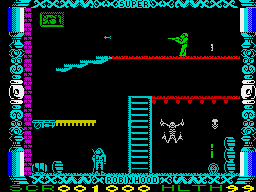
I was pretty young when I got it, maybe around 6 or 7 and I still remember sitting on a toy box with my uncles after they had set it up for me and my mum giving them into trouble for not giving me a shot cause they were so amazed by it as well (they were about 30 at the time). There were some great games on it, my favourites being Dynamite Dan, Fast Food (which my mum rocked at!) and Robin Hood which was really long but had great controls and just felt really smooth to play.
Dynamite Dan For years all I could remember about the game was the giant cheese in the bath
Fast Food My mum was so good at this she got onto the upside down levels
Robin Hood This game was HUGE great fun though
I never really got into programming on the Specturm which had a BASIC compiler built into it but my friend did and I remember seeing a 'hello world' game he had programmed and not being very impressed.
I think it was after that that I got my Atari. No huge memories of that other than Outlaw which I loved.
Outlaw
Then came the Sega Master System and afterwards the Mega Drive. The Master System was ok but it was really the Mega Drive I fell in love with.
Blast Processing! The Sega Mega Drive, computer of the gods
Without a doubt my favourite game was Toejam and Earl. It was just huge! Great fun as well and a brilliant co-op game, to this day one of the best I've ever played. It was colourful and humorous and the randomized levels meant you could play it repeatedly without getting fed up. The only real problem it had was no save points so quite often I'd play for an hour or so and then get fed up and have to restart all over again on the next play through, often getting to the same point and then getting bored again.
Toejam and Earl One of the best co-op games ever
Other greats from my childhood include Golden Axe, Sonic 2, Wiz and Liz, Skitchin, Road Rash, Rock 'n' Roll Racing, Worms... I'll leave it at that.
I enjoyed the Mega Drive so much that a once I got a job and started earning some proper money I took up collecting the games again. To date I've got about 230 games and splashed out recently on a flash cart to allow me to play homebrew and ROM hacks on the original console. I'm not one of those purists (read snob) that thinks emulators are for lamers but there is something more enjoyable about playing games on the original hardware that you just don't get from them. Still they are great to play hard-to-get games on and for development (and cheating!)
I even got into ROM hacking for a while I still do it here and there when I have the time. You can check out my site www.mybrillgamesite.com to see some of the stuff I've done.
After the Mega Drive came the usual: Playstation, N64, Dreamcast, Playstation 2, DS, XBox 360 and that's where it ends. Nothing to say about them really other than GTA 3 blew me away and was the reason I bought a PS2.
GTA 3 The game changer in video games
I think I got my first PC when I was about 12, maybe a little younger. It cost my mum over a grand and she was paying it off forever! That's my mum for you though, she'd never see me go without even if it meant sacrificing the stuff she wanted.
It ran Windows 95 which my mum's friend tried to downgrade to 3.1 because he thought it would be too complicated for me. This resulted in him breaking it (it wasn't 3.1 compatible) and us having to return it to the shop! Thankfully they fixed it (I can't remember if we had to pay or no) and I got a working computer again. My only real memories of it are it having this weird program called 'BASE' which was a picture of a lounge (living room) which came on at start up and you could click on things to open programs, like the TV would open Windows Media Player, the briefcase would open My Briefcase and so on. It sucked and was soon removed.
I also took my copy of Warcraft into school on the last day of term (we could take toys in to play with then) and the teacher didn't let me install it on the computer cause she said it wouldn't work (she was right as it was an Acorn computer) and when I got home I found it had slipped out of its paper case and got scratched, breaking it. What a waste, I was gutted.
Warcraft
Then it was what I think is the usual progression for a kid interested in computers - taking things apart, learning about upgrades, falling in love with the internet (my friend had it before me so I used to always go to his to use it, even tried once when he wasn't in but his dad said no) (I also got banned from AOL 3 times within 6 months!), getting bored during computer class cause you knew everything already or could fire through the work in 10 minutes.
Fast forward a few years and a degree in Artificial Intelligence later and here we are.
Just now I've got a real interest in computer vision and reasoning upon what the computer can 'see'. In my sister blog workingwithcomputervision.blogspot.co.uk I talk specifically about this topic and am working on a game player that works using computer vision, it's interesting and you should check it out if you are into that sort of thing.
I'm also fascinated by Infinite Mario and Automated Driving (i.e. Darpa Grand Challange) although I haven't looked into them although that much. Still great concepts though.
Well, I'm a fan of all things computer related, zombie related and gardening related. Ok, maybe not all things but certainly most things. In fact with respect to gardening I just like pottering about and I'm not too interested in all the ins and outs of it but I do enjoy it, even if I am a complete amateur. When it comes to computers I like to think I'm a bit more experienced, having spent most of my life around them and having spent 4 years studying for a degree in Artificial Intelligence at The University of Aberdeen and now working as a software engineer. I guess my zombie experience, my real life zombie experience that is, that being the actual experience with real life zombies, is, perhaps unsurprisingly, non-existent but I certainly enjoy the genre! In a world stagnated with zombie related things I still can't get enough! It may be controversial but both the traditional shambling zombies and the more recent runners are good in my book and I think any sensible zombie apocalypsesurvival plan will take account for both situations (and of course a mixture of the two!).
So I've decided to fire up a blog that discusses all three topics and tries to relate them to one another in some shape or form, as you do.
The general premiss is going to be relating how my work with computers and my time spent in the garden can be used to help in the upcoming and inevitable zombie outbreak. I'll also from time to time fire up some garden, computer or zombie related content might not make any great contribution to your survival plan but should hopefully be interesting none the less.